01
New projects
A paragraph about the problem is enough to start. We reply within two working days, usually with questions rather than a quote.
Model Context Protocol servers that give AI agents scoped, audited access to your systems: OAuth scopes per tool, rate limits, and a log of every call.
The Model Context Protocol (MCP) is an open standard for connecting AI assistants and agents to tools and data. An MCP server exposes your system — an API, a database, an internal service — as tools an agent can call. We build MCP servers with scoped OAuth, rate limits and an audit log, so giving an agent access does not mean giving it everything.
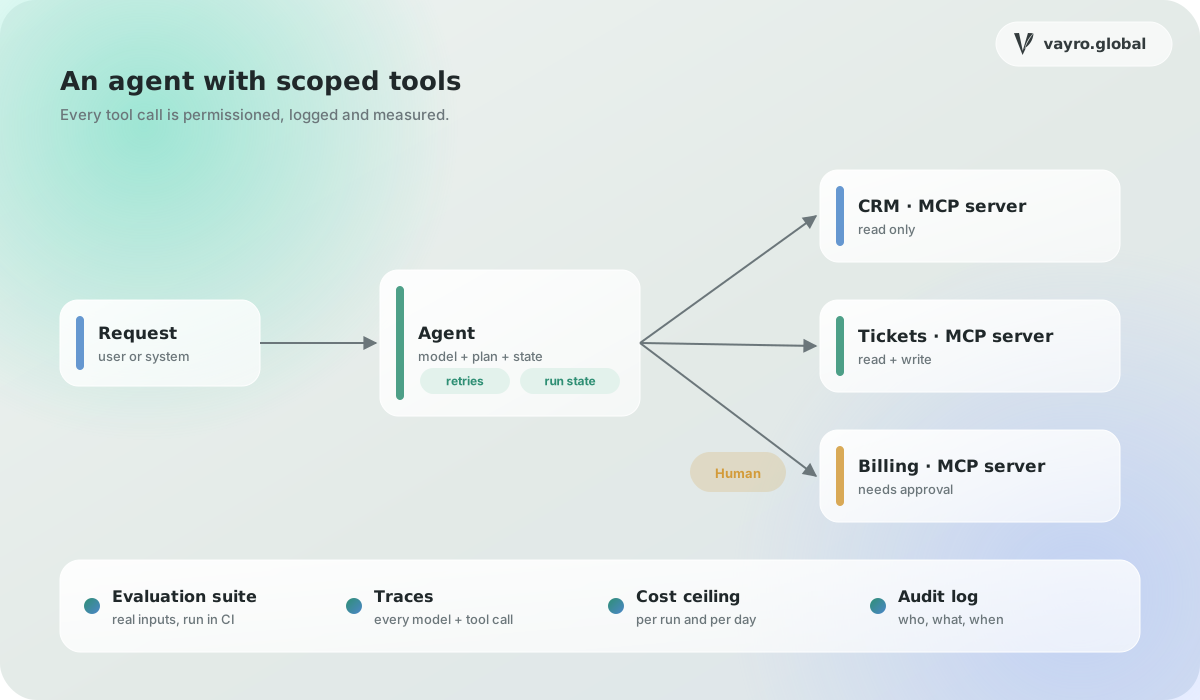
Tools shaped around tasks rather than endpoints, with clear descriptions, typed inputs and results a model can act on.
Authorization per user and per tool, with read scopes separated from write scopes and tokens that expire.
A server that can read customer records and also post to a chat tool can leak one into the other. We split servers along those lines.
Limits per user and per tool, and errors the agent can understand when a downstream system is slow or refuses.
Every tool call recorded with who asked, what was sent and what came back, retained for as long as your policy requires.
Which actions an agent should be able to take, which it should not, and who is allowed to authorize each.
A short list of well-described tools, tested with a model before any production code is written.
Authorization, limits, logging and tests, including attempts to make the server do something outside its scope.
Deployed as a remote server with setup instructions for the clients your users actually have.
A paragraph about the problem is enough to start. We reply within two working days, usually with questions rather than a quote.
Engineers, designers and researchers who like systems that are hard to get right. Send something you built and what you would change about it now.
Based in India and working remotely, with overlap hours agreed up front so your team always has a time to reach us.
Guides on AI agents, RAG, MCP, tokenization and chain abstraction, written by the engineers who build them.